An AI studio that runs on your governed gateway.
Not a toy. Every turn in the playground runs through the same governed /v1 endpoint and virtual key as your production traffic — billed, budgeted, allowlisted, and audited.
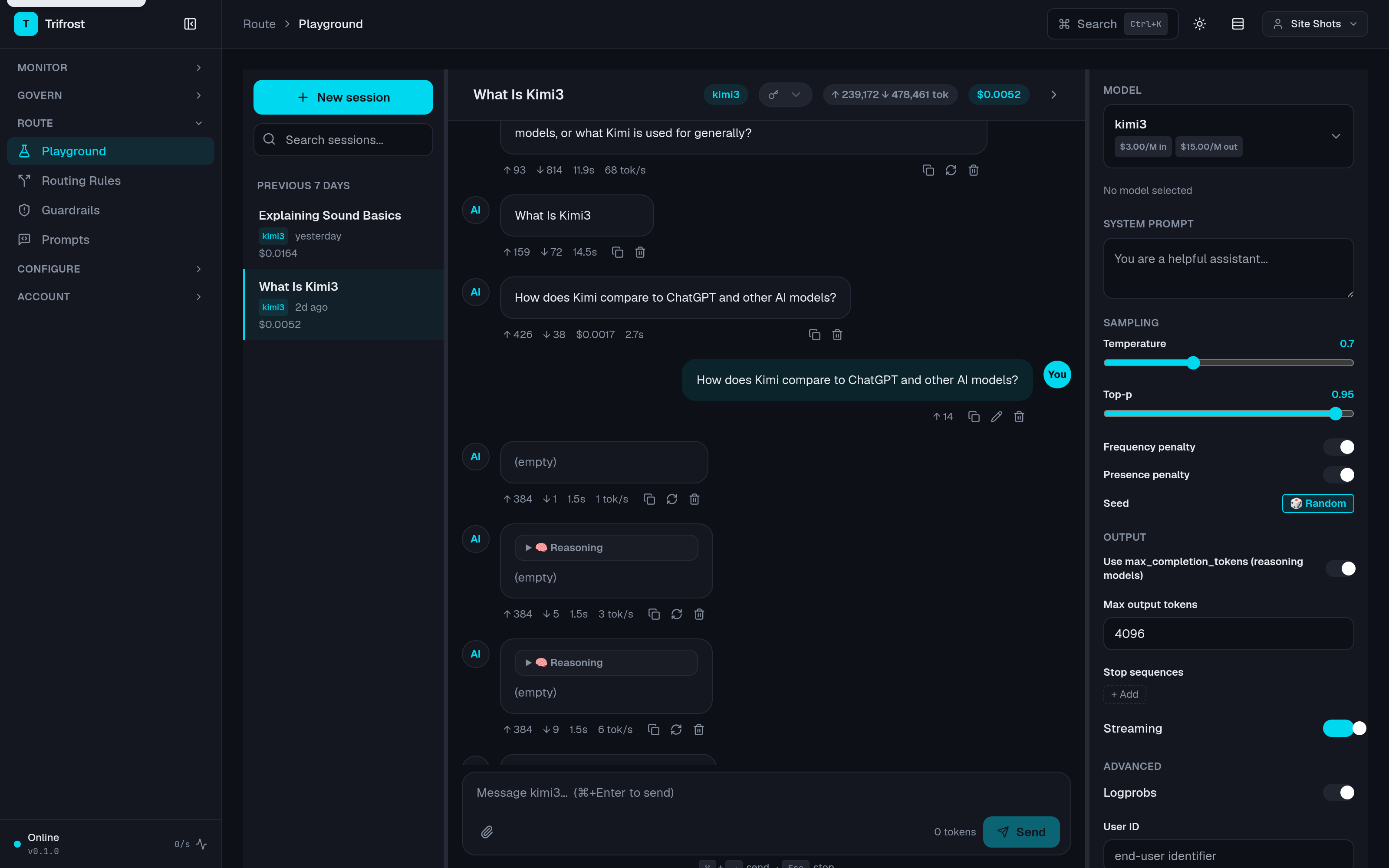
Model picker to audit trail in five steps.
01
Pick a model
The model picker shows pricing inline. When the model is a multi-provider alias group, you see exactly which providers back it — before a single token leaves your browser.
02
Chat
Streaming by default. Reasoning models get collapsible Thinking bubbles — reasoning_content / reasoning / thinking — rendered live and persisted across reloads.
03
Steer providers
Alias groups expose per-member Require / Block tri-states and a Prefer-first selector, with a live preview of the provider JSON your turn sends. How the gateway resolves it →
04
See the system calls
Title generation and suggested-next-prompt chips surface as read-only utility messages — model, tokens, cost, latency, status, and a request_id that links to the event log.
05
Watch cost accrue
Every turn carries its tokens, cost, and latency. The session header keeps a running rollup — so "what is this experiment costing me?" is always on screen.
06
Keep the work
Multi-session chat with persistence, a context meter so the window never surprises you, and one-click markdown export when the conversation becomes a document.
Require. Block. Prefer. Per request.
Pick a multi-provider alias group and the params panel gains a routing control: Require or Block each provider member, Prefer one to lead, and watch the exact provider JSON compose itself as you click.
- Honored everywhere — chat turns and the hidden utility calls use the same directive
- Reset on model switch — a stale strict only slug can never 400 your next conversation
- Same semantics as the API — OpenRouter-style only / ignore / order, matched by slug
{
  "model": "kimi3",
  "provider": {
    "ignore": ["digitalocean"],
    "order": ["fireworks"]
  }
}
// failover stays inside your constraints —
// a blocked member is never a candidate.
Even the system calls show up.
The playground makes its own background inference calls — session-title generation, suggested-next-prompt chips. Most tools hide those from you. Trifrost meters them, attributes them, and lists them in the chat history as read-only utility messages.
- Full telemetry per call — kind, model, tokens in/out, cost, latency, status
- Expandable detail — the actual request and response, one click away
- request_id end-to-end — jump from the message to its HMAC-signed row in the unified event log
A real workbench, not a demo box.
Full params panel
Temperature, top-p, frequency and presence penalties, seed, max tokens, stop sequences, streaming, logprobs, and JSON mode — the knobs your SDK has, in the UI.
Sessions that persist
Multiple concurrent sessions, reload-safe history, reasoning bubbles intact. Close the tab mid-investigation and pick up exactly where you left off.
Context meter
A live read on how full the context window is, so you find out you're near the limit from the meter — not from a truncated answer.
Same endpoint. Same key. Same rules.
The playground is billed through the same governed endpoint as production — budgets deduct, allowlists apply, and every turn lands in the audit log. It is the fastest way to see your budgets, allowlists, and audit trail actually working.